Email Provisioning via API: How to Automate Email Service Management for Your Customers

For resellers and MSPs managing email services for multiple customers, tasks such as creating domains and mailboxes, configuring accounts, or modifying services can become repetitive as the number of managed resources grows.
Email provisioning via API allows you to integrate these operations directly into your systems, reducing manual work. Email service activation and management can become part of the same workflow used to manage customers, orders, and billing.
This approach is particularly useful for email resellers, MSPs, and hosting providers looking to expand their customer base without a proportional increase in operational workload.
What Is Email Provisioning?
Email provisioning is the process of creating, configuring, and managing the resources required to provide an email service.
This can include setting up a domain and its mailboxes, configuring email aliases, or preparing an account for sending emails.
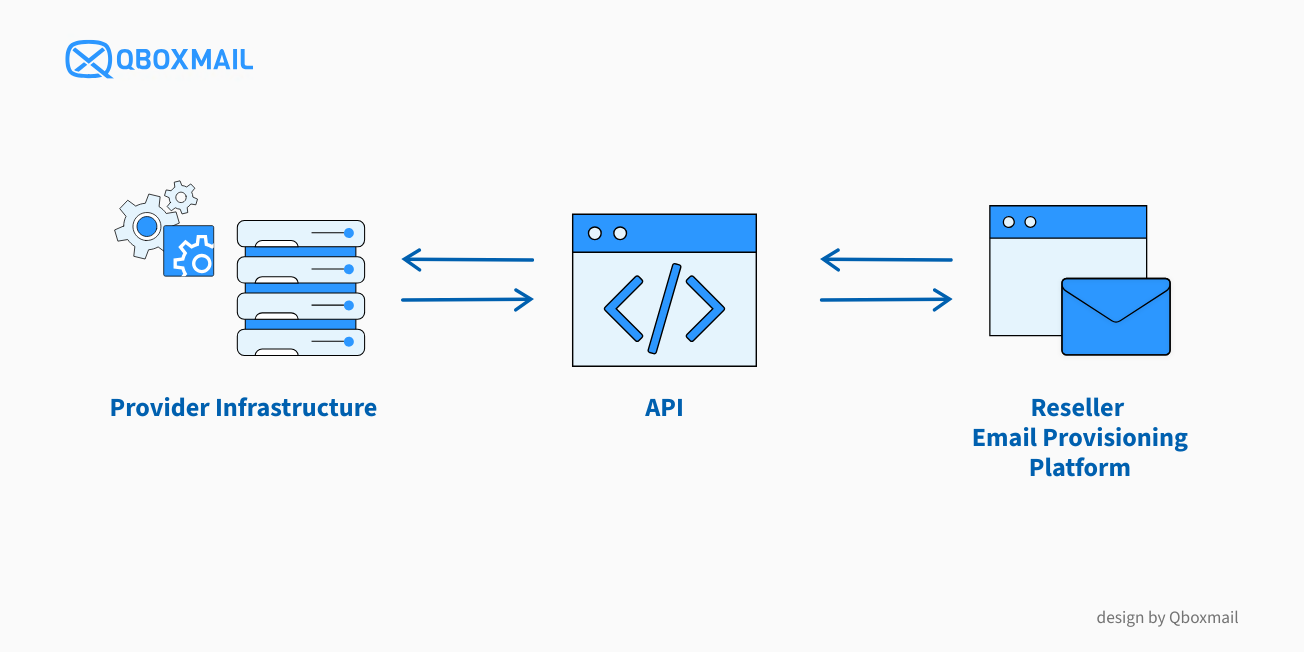
These operations can be performed manually through an administration panel or automated through APIs, allowing your management software to communicate directly with the platform providing the service.
Why Automate Email Provisioning?
APIs allow you to integrate email service activation and configuration into existing business processes, for example, by connecting them to incoming customer orders.
A typical workflow might look like this:
Customer order → Management system → API request → Email service configuration → Management system update
Provisioning becomes part of the customer management lifecycle rather than a separate task requiring manual intervention.
For ICT service providers, this means connecting email services to their existing provisioning, billing, or automation systems, maintaining a single operational workflow.
What Can You Automate with Email Hosting and Email Delivery APIs?
The operations you can automate depend on the API capabilities provided by your email service provider. Before integrating an email service, it is important to check which resources can be created, modified, and monitored programmatically.
Qboxmail provides a Management API to create, configure, and monitor Email Hosting and Email Delivery resources, allowing resellers and MSPs to integrate these services into their existing systems.
It also provides the Send API, which enables automated sending of transactional and promotional emails using an Email Delivery account.
Manage Email Hosting Domains and Mailboxes
Email provisioning is one of the main use cases for the Management API, but its capabilities extend beyond provisioning. The Management API allows you to create and configure domains and mailboxes, manage postmaster accounts, aliases, signatures, address books, and contacts, as well as handle email imports and migrations, configure archiving, and manage permissions.
The API also allows you to retrieve access logs and incoming and outgoing email traffic logs, integrating monitoring information into your own systems.
These features allow resellers to manage multiple resources through their applications, complementing or replacing manual operations available in the Control Panel.
Configure and Monitor Email Delivery via API
The Management API also allows you to manage Email Delivery resources, including sending domains, DNS verification, and accounts for transactional or promotional emails.
It also provides access to dashboard data, TraceMail logs, counters, and daily statistics, which can be used to monitor the service through external systems.
The Send API, on the other hand, is used to send messages through previously configured Email Delivery accounts.
The distinction is straightforward: the Management API manages service resources, while the Send API sends emails from applications.
For more information about the Send API, see the dedicated documentation.
The Send API provides two endpoints for sending messages, which differ in how emails are prepared and processed.
Send Messages: Send Complete Email Messages via API
The Send Messages endpoint allows you to create and send one or more email messages by specifying the sender, recipients, subject, and plain-text or HTML content.
It is particularly useful for integrating notifications, order confirmations, and transactional emails into applications without having to manage each send manually.
Send Bulk Messages: Personalize Emails for Multiple Recipients
With Send Bulk Messages, you can send emails to multiple recipients using a single template.
Variables allow you to personalize the subject line and message content for each recipient, making this endpoint suitable for sending personalized emails in bulk directly from software and applications.
For example, a management system can send the same communication to multiple customers, automatically personalizing their names, order references, or other information through a single API request.
Manage Roles, Permissions, and Resources via API
For MSPs managing email services for multiple organizations, it is important to assign resources and define different access levels for users.
The Management API includes features for creating and managing managers and team members, configuring their permissions, and assigning the resources they can access.
API requests are authenticated using tokens and follow the access permissions of the associated user. For example, a manager can be assigned specific domains and Email Delivery accounts, restricting access to the resources under their responsibility.
This allows resellers to develop integrations that reflect their organizational structure and access control requirements.
For a complete overview of available resources and operations, see the Qboxmail Management API documentation.
Integrate Email Services into Your Management System
One of the most relevant use cases for resellers is integrating email service sales into the systems they already use to manage customers and orders.
For example, an MSP selling Email Hosting services through its customer portal can connect the purchase of a plan to the creation of the required resources.
If a customer orders email hosting for a domain with five mailboxes, the management system can initiate requests to the Management API and check the status of the operations before updating the service information in its own system.
The same approach can be applied to subsequent changes, integrating the available operations into the company’s existing workflow.
For providers already using WHMCS, email mailbox sales and management can also be integrated through the Qboxmail WHMCS module.
APIs are particularly useful when you need to build custom workflows or connect Qboxmail to internally developed management systems and platforms.
Build Custom Dashboards and Workflows for Your Customers
APIs also allow you to integrate email service management features directly into your applications.
For example, a provider can develop a dashboard where customers can create new mailboxes, change mailbox storage quotas, manage aliases, or reset passwords without accessing the Qboxmail Control Panel.
This allows you to decide which features to make available to customers and which operations should remain under administrator control.
For providers offering services under their own brand, this integration can complement Qboxmail’s White Label features, helping deliver an experience consistent with the reseller’s brand identity.
What to Check Before Automating Email Provisioning
Before integrating the Management API into your management system, it is important to understand some technical and operational requirements.
- Authentication and permissions: Management API requests require an authentication token sent through the X-Api-Token header and follow the permissions of the associated user. For example, a manager can only access resources assigned to them.
- Asynchronous operations: Some operations, such as domain activation, DNS verification, and mailbox creation, may be asynchronous. Where available, resource status fields allow you to check activation, updates, or conditions preventing an operation from being completed.
- Billing profile requirements: To manage paid resources via API in the production environment, the customer must already have a Qboxmail billing profile. Otherwise, the first order must be completed through the Control Panel. Exceptions apply to customers using Email Hosting during the 30-day free trial and to the Sandbox environment.
For more details about these requirements, see the official Qboxmail Management API documentation.
When Should You Use API-Based Email Provisioning?
Not every process requires a custom integration.
For providers managing only a few accounts and making occasional changes, the Control Panel may be sufficient.
APIs become particularly useful when:
- You manage multiple customers, domains, or email accounts
- The same operations need to be performed frequently
- You already use a management or billing system that needs to integrate email services
- Email services need to be included in automated workflows
- You want to offer customers email management features within your own platform
Before developing an integration, it is useful to identify which repetitive tasks generate the most work and which can be automated within existing processes.
The goal is not to automate every operation, but to reduce manual work where it creates the greatest operational complexity.
Automate Email Provisioning with Qboxmail
Integrating email provisioning into existing systems allows resellers and MSPs to manage their customers’ email services more efficiently while reducing manual tasks.
With Qboxmail APIs, you can integrate Email Hosting and Email Delivery into your management systems and applications, building activation and management workflows tailored to your business needs.
Discover the Qboxmail APIs and explore the technical documentation to plan your integration.