PTR Record and Reverse DNS: How DNS Configuration Issues Can Block Email Delivery

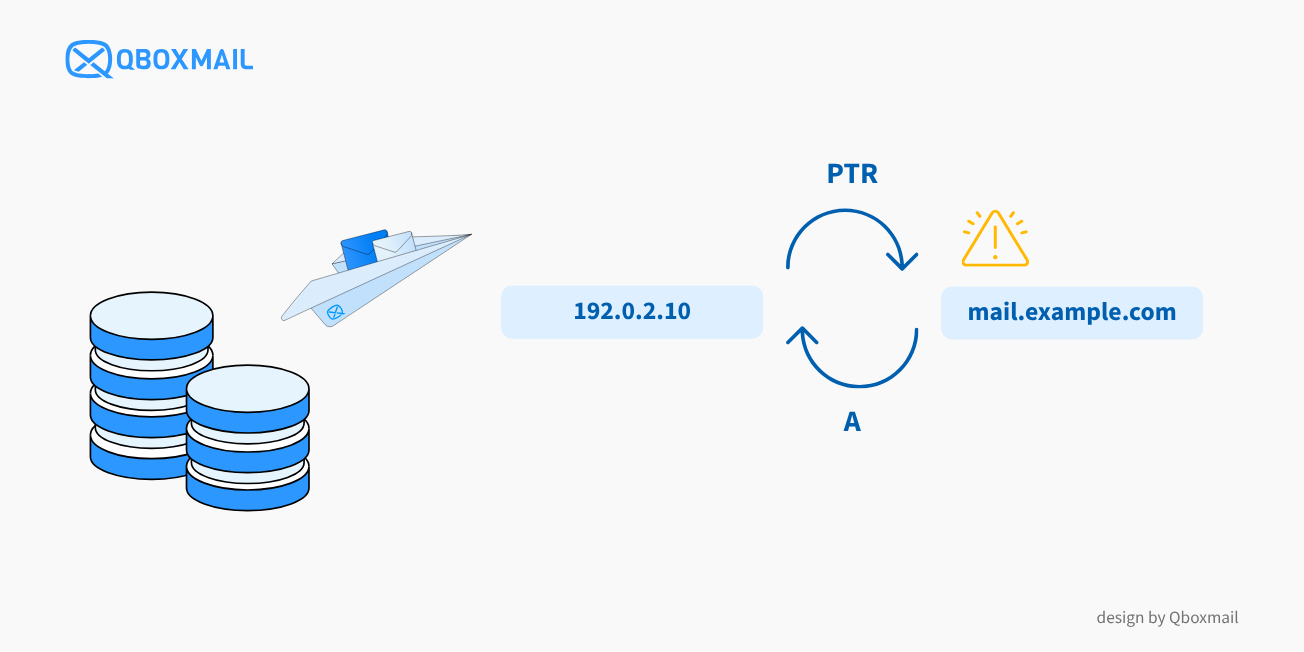
An SMTP server may be working correctly and successfully establish a connection to the recipient’s MX server, yet some emails may still be rejected.
In these cases, one of the first things to check is the Reverse DNS of the SMTP server’s IP address and, in particular, whether the PTR record is present and correctly configured.
This is not a secondary check. Gmail requires sending IP addresses to have valid and consistent reverse DNS records, meaning that the A record of the server hostname must match the PTR record. Yahoo also explicitly recommends valid, specific, non-generic PTR records for mail server IP addresses, such as mail.example.com rather than ip-192-0-2-10.dynamic.net. Other antispam systems also use Reverse DNS as one of the factors analyzed during the SMTP connection.
This does not mean that every rejected email necessarily has a PTR issue. However, an incorrectly configured Reverse DNS chain – rDNS → hostname → IP – is still a problem that needs to be fixed.
What Is Reverse DNS and What Is a PTR Record Used For?
In a standard DNS lookup, a hostname is associated with its corresponding IP address. For example:
mail.example.com → 192.0.2.10
Reverse DNS, also known as rDNS, performs the lookup in the opposite direction, starting from an IP address to identify its associated hostname. This association is defined through a PTR record.
In email communications, the receiving server can therefore use Reverse DNS to check which hostname is associated with the IP address of the server attempting to deliver the message.
Qboxmail has previously covered this topic in its guide to configuring Reverse DNS correctly, explaining that the hostname associated with the rDNS should correctly identify the mail server hostname. Qboxmail guide to configuring Reverse DNS.
rDNS and the Hostname Must Be Consistent in DNS
Having a PTR record is not enough on its own to ensure that the configuration is correct.
For example, if a server sends email from:
192.0.2.10
and the Reverse DNS lookup returns:
192.0.2.10 → mail.example.com
the DNS lookup for that hostname should point back to the same IP address:
mail.example.com → 192.0.2.10
If mail.example.com resolved to a different IP address, there would be an inconsistency between the Reverse DNS and the forward DNS lookup.
The configuration can therefore be represented as a chain:
Sending IP → PTR → hostname → A/AAAA → sending IP
In a consistent configuration, this path forms a kind of closed loop: starting from the IP address, the PTR record leads to the hostname, and resolving that hostname leads back to the same IP address.
Why Reverse DNS Matters for Email Delivery
When a mail server receives an SMTP connection, it can analyze several signals before deciding whether to accept the message.
Reverse DNS is one of them.
An IP address without a PTR record, a hostname that does not resolve correctly, or an inconsistent configuration may indicate that the sending infrastructure has not been configured correctly.
However, this should not be confused with domain authentication.
rDNS, SPF, DKIM and DMARC Serve Different Purposes
SPF specifies which IP addresses are authorized to send email on behalf of a domain; DKIM applies a cryptographic signature to the message; DMARC relates these mechanisms to the domain used in the From field and makes it possible to define a policy for messages that do not pass the checks.
You can learn more about how these protocols work together on the Qboxmail page dedicated to SPF, DKIM and DMARC.
A domain can therefore pass SPF and DKIM while still using a server with an incorrectly configured Reverse DNS. Likewise, a correct PTR record does not replace SPF, DKIM or DMARC.
Is Missing Reverse DNS Always Enough to Block an Email?
A missing or incorrectly configured Reverse DNS can be a negative factor, but it should not be evaluated in isolation.
While managing its antispam system, Qboxmail has observed cases in which legitimate emails were penalized because Reverse DNS was missing, even though the sending IP addresses were not listed in the main DNSBLs.
For example, many printers, alarm systems, elevators and telemetry systems send emails from IP addresses associated with business internet connections using static or dynamic IPs but generic hostnames.
This experience led us to reassess the weight given to this single check in order to reduce the risk of false positives, as described in our article on reducing false positives in antispam systems. Reducing false positives in antispam systems
This experience shows why Reverse DNS should be evaluated together with the other signals used during email delivery.
Mail systems may take into account infrastructure configuration, authentication, IP reputation, domain reputation, sender behavior and other signals.
How to Tell Whether PTR and Reverse DNS Are Really the Problem
When an email is not delivered, the first thing to check should be the SMTP transaction log.
The response returned by the receiving server may contain key information explaining why the message was not accepted:
SMTP code → enhanced status code → error description
Reading the complete response helps distinguish a Reverse DNS issue from an authentication error, a temporary restriction or a reputation problem.
For Qboxmail customers, Tracemail makes it possible to analyze message logs and, for Email Delivery, check whether a message was delivered or identify the reasons for non-delivery. Bounces are also classified into categories to make deliverability issues easier to identify.
A Practical Example: Gmail Error 451 4.7.23
A useful example of how to read an SMTP log is Gmail.
Google documents the following code:451 4.7.23
for situations in which the sending IP address has an issue with its PTR record or with the correspondence between Reverse DNS and Forward DNS. Qboxmail
The important point, however, is not the 451 code alone.
SMTP code 451 indicates a temporary condition, but it can be associated with different issues.
To identify the actual cause, you also need to read:
- the enhanced status code
- the complete text returned by the server
- any references to the IP address, DNS or reputation
How to Check Whether PTR and Reverse DNS Are Configured Correctly
If the message returned by the receiving server actually indicates a Reverse DNS issue, you can follow a structured verification process.
- Identify the IP Address Actually Sending the Email
The first step is to identify the public IP address from which the SMTP connection is being established.
Do not assume that it is the same IP address used by the website or domain.
An application may use an SMTP server or an Email.
Delivery service that is completely separate from the website hosting infrastructure. - Check the IP Address PTR Record
Perform a Reverse DNS lookup on the IP address.
The result should return a valid hostname, for example:192.0.2.10 → mail.example.com
If no hostname is returned, the PTR record may not be configured. - Check the Hostname Forward DNS
Now perform the opposite lookup on the hostname:mail.example.com → 192.0.2.10
The configuration is consistent when the hostname specified by the PTR record resolves back to the IP address used by the sending server. - Check HELO/EHLO
During an SMTP session, the sending server identifies itself using the HELO or EHLO command.
The hostname used at this stage should also be consistent with the mail server configuration.
Qboxmail has also covered the relationship between HELO and DNS/SPF configuration in a dedicated technical article.HELO and DNS/SPF configuration - Check the Logs Again
After correcting any inconsistency, check subsequent SMTP responses to verify whether the original issue has actually been resolved.
Following this sequence helps avoid one of the most common mistakes in email troubleshooting: changing several parameters at once without knowing which one was actually causing the rejection.
Is the PTR Record Correct but Emails Are Still Being Rejected?
A correct Reverse DNS configuration is an important technical requirement, but it does not guarantee on its own that a message will be accepted or reach the inbox.
If the PTR record, Forward DNS and HELO/EHLO are consistent, go back to the SMTP response and investigate the other possible causes.
Depending on the error, you may need to check:
- SPF, DKIM and DMARC
- IP reputation
- domain reputation
- sending volumes and patterns
- bounces and spam complaints
- specific policies applied by the receiving provider
- whether the IP address is listed in a DNSBL
In particular, it is important to distinguish IP reputation from Reverse DNS configuration. An IP address can have a perfectly configured PTR record and still have reputation issues.
To check domain records, Qboxmail also provides a Toolbox with tools for checking MX, SPF and DMARC records, as well as the IP Blacklist Verify tool.
Reverse DNS or IP Reputation? The SMTP Response Tells You Where to Look
Reverse DNS is therefore one of the checks to perform when a receiving server rejects or limits a message, but it should always be interpreted together with the SMTP response.
If the error refers to PTR or rDNS, check the following chain:
IP → PTR → hostname → Forward DNS → HELO/EHLO
If, on the other hand, the response refers to the IP reputation or its presence on a blocklist, troubleshooting should move to blocklists and the reputation of the IP address.